
SharePoint 2013 and Office 365 (SharePoint Online) App Provisioning and Installation Options

App deployment is different from app development.  App deployment is depends on how administrator is going to install the app. App deployment can be done in

  • Web Scope
  • Tenant Scope

For both deployments we need App Catalogue in functioning. Apps are currently coming from two main sources as From Organization and From SharePoint Store

image

Web Scope installation

This is what we generally do. Here we are navigating to desired web (assume  the web is http://www.sharepoint.com/sites/myweb) and click the setting button and launch Add an app

image

Then you can either browse and install app from office store or organization store.

image image

in this approach app is installing as a sub web under current web. and data will be scoped to the particular web we installed. The web site which actually holds app data and functionality is called App Web (sub web) and The web site we installed the app is called as Host Web (current web).

image

For an example assume installing MyApp under myweb.  In this scenario /sites/myweb becomes a Host Web for myApp and installing MyApp provisioning a sub web (/sites/myweb/MyApp) that becomes a App Web for particular MyApp. installing MyApp under sub site; sites/myweb/myweb2 resulting; sites/myweb/myweb2 been a Host web for particular MyApp instance and /myweb/myweb2/Myapp as a App Web for that MyApp instance.

Tenant Scope Installation

image

This installation is different from web scope installation. here we are installing app in App catalogue site and then it becomes Host web for that application.

First you need to navigate to your app catalogue site collection and perform app installation in that site.

image

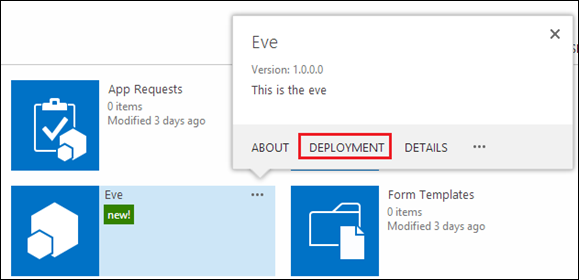
Then select and installed the app. after that go to Site Contents and open the callout menu for that app. You can see Deployment Menu.
image

If you click on that you can see following tenant deployment options.

  • Site Collections
  • Managed Paths
  • Site Templates

Site Collections : here you can specify which site collections you need to deploy. You can enter multiple sets of site collections. Thus app will be automatically provisioned under all webs inside that site collection.

image

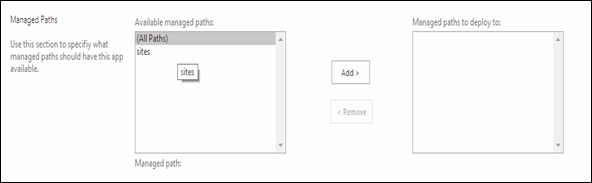
Managed Paths: This will provision the app in webs under that manage path.
image

Site Templates: This will provision the app for webs that inherits from mentioned template.

 image

Comments

Popular posts from this blog

How to Link Two List and Create a combine view in the SharePoint 2010

In this way you can join multiple list together and can create a combine view. for an example assume that you are managing a list for some events. And also you are having a participants in separate list. Thus you want to join the two list and create a composite view. SharePoint 2010 allows you to create this kind of view using  Linked Data Source. in this approach you can create your own custom list in the SharePoint. How to Create a Linked Data source Go to SharePoint designer and  go to the link called data sources. And Click the Linked Data Source button in the ribbon. Then SharePoint designer will prompt following kind of a dialog. In there add two list, that you wan to linked together. I'm adding airline schedule and booking list. those are the two list that i wan to merge. then click next. And it will guide you another screen. it will ask you to select either Merge Merge use to combine list which are having same columns definition. for and example we can s...

How to Improve Workflow Performance in SharePoint Server 2010

SharePoint workflows are getting  slow for several reasons. in my environment I'm having a problem with following performance issues, therefore in my environment i got following problems. When a item added to the library it takes some times to initiate the workflow. Workflow mail generating is not very fast sometimes. Workflows takes more time to process “Due to heavy load, the latest workflow operation has been queued. It will attempt to resume at a later time” is coming sometimes. I had a custom workflow approval web part and it is taking more than 30 seconds to proceed. Work Done I had a custom workflow approval web part and it is taking more than 30 seconds to proceed. here in my custom web part there is the function which is programmatically updating the workflow. SPWorkflowTask.AlterTask(item, data, false) the last parameter mentioning whether it is synchronous asynchronous. if  is it true it it will wait until workflow schedule accept the workflow task. ...

How to Customize New Item Form to take parameters from Query String in the SharePoint 2010

In here I'm going to explain how to customize the SharePoint Item From to take parameters from Query String and set them as default values using SharePoint designer. Using this you can open a new Item From by providing parameters as query string. For an example you can customize one item Display form and taking query String Parameter from that and view New Item view for another list by providing default values using the Query String.     Steps Open the SharePoint designer and go to list and libraries and open the list that you want. Click the New and create a New Insert View by providing the name of the view.   Then created one will come to the list. then click and open the view. Then default New Item Screen will be loaded as follows. Then Delete the default list view and make that empty. You can delete the controls by selecting the area in the design view, If it fully cleared you can view the following message from the designer. Then go to SharePoint...